
Chat sidebar
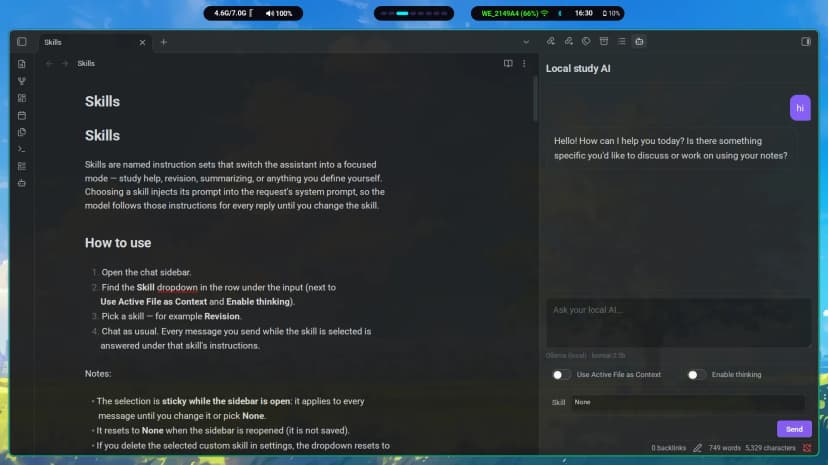
Open from the bot ribbon icon or the Open local study AI command.
Conversation context is kept while the sidebar stays open.
Everything the plugin does, in one place. For step-by-step usage see the Guide; for provider setup see Providers.
Open from the bot ribbon icon or the Open local study AI command.
Conversation context is kept while the sidebar stays open.
Answers appear token by token with live Markdown rendering — headings, lists, tables, links and code blocks as they arrive.
The Send button becomes Stop while the model works. Cancel any time; text already received is kept.
Ollama (local, default), OpenAI, Anthropic Claude, OpenRouter, Groq, Gemini and custom OpenAI-compatible servers — each with its own saved base URL, API key and model.
Under the input, always showing which model will answer your next message
(e.g. Gemini · gemini-2.5-flash). Updates instantly on settings change.
Lets thinking models reason before answering — slower, but often better for hard problems. Synced between sidebar and settings; hidden for cloud providers.
Ground answers in the open note: its beginning (up to 20,000 characters) is attached to every request as the primary source.
Built-in Study help, Revision and Summarize, plus custom skills you create. The selected skill applies until changed.
Append your own preferences (“always answer in bullets”) to every request, after the built-in study-assistant prompt.
Lists the models each provider offers, with a Refresh button to reload the list from the server.
Hover a reply for the copy icon — copies raw Markdown, even mid-stream. Select part of a reply first to copy just that part.
Requests go to the Ollama URL you configure. Cloud providers are opt-in, and loading/error states appear directly in the chat.
| Setting | Default | What it does |
|---|---|---|
| AI provider | Ollama (local) | Which backend to chat with. |
| Base URL | Per provider | Server address for the selected provider. |
| API key | Empty | Key for cloud providers (stored in plain text — see Privacy). |
| Model | llama3.2 (Ollama) | Model selected from the provider's list. |
| Enable thinking | Off | Lets Ollama thinking models reason before answering. |
| Custom instructions | Empty | Extra instructions appended to every request. |
| Custom skills | None | Your own entries in the Skill dropdown. |